

Check out the information below to learn how to utilize the Adoptions Made Easy (AME) system to easily track your Canada K9 Rewards throughout the year.
Log into AME and click on the Reports icon at the top of the page.

Select the “Adoptions by Pet” on the drop-down menu in the upper-right corner.

- To filter for Dog Only adoptions for Canada K9 Rewards eligibility, use the filtering options below:

- Partner: Type in the name of your organization, click on the name that appears on the box, and then click Apply.
- Pet Type: To filter for dog adoptions that are eligible for K9 Cash bonuses, select Dog from the dropdown menu.
- Adoption Validated: Select Validated to display all completed adoptions.
- Adoption Start Date and Adoption End Date: Filter for specific Adopt Joy event dates by entering a start and/or end date for adoptions.
Helpful Tip: The reporting in AME defaults to 12 months so if you are unable to select the month last year or it’s grayed out, try changing the end date first, then you should be able to change the start date.
2-for-1 Adoptions: Each dog adoption processed on Adopt Joy event dates will count as 2 toward your organization’s adoption partner rewards.
Year-end Bonus: To qualify for the year-end cash bonus, your organization must complete at least two (2) dog adoptions during at least eight (8) of the Adopt Joy™ adoption event dates in 2026: February 21, March 28*, April 25, May 23, June 27, July 25*, August 22, September 26, October 24, December 5 & January 16, 2027
Adoptions must be completed on the day of the adoption event.
Other Useful AME Reports:
Ongoing Transactions Report: This report lists all the adoptions that have not been finalized and therefore are not eligible for incentives in their current state. Use this report to identify pending adoptions and finalize them as appropriate. Please note that for the adoptions to be eligible for Canada K9 Rewards, they must be started AND finalized on the eligible adoption event date listed above.
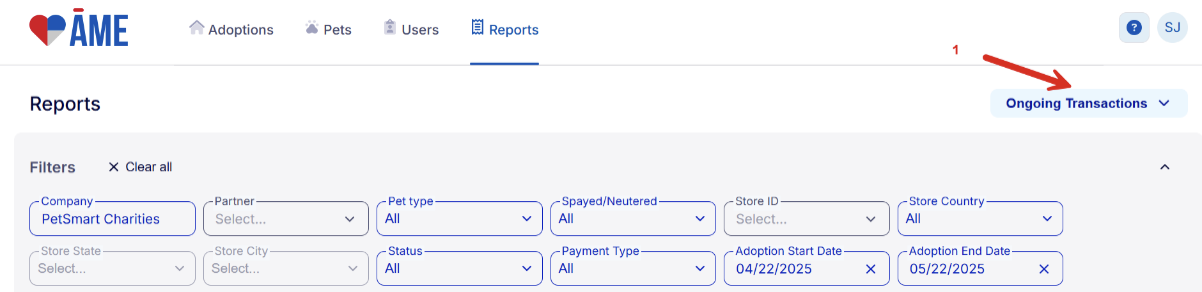
- To run the report, select Ongoing Transactions from the drop-down menu at the top right-hand side of the page. You can use any of the filters to find specific adoptions.
If you would like to download a report, click on the Download link at the bottom left-hand side of the page. When the download is complete, a notification will appear, and clicking on the Open Now link will convert the report to an Excel document that can be opened and saved for future use.
If you have any additional questions on using AME to track adoptions eligible for Canada K9 Rewards, please reach out to adoptions@petsmartcharities.org.